




- My Forums
- Tiger Rant
- LSU Recruiting
- SEC Rant
- Saints Talk
- Pelicans Talk
- More Sports Board
- Fantasy Sports
- Golf Board
- Soccer Board
- O-T Lounge
- Tech Board
- Home/Garden Board
- Outdoor Board
- Health/Fitness Board
- Movie/TV Board
- Book Board
- Music Board
- Political Talk
- Money Talk
- Fark Board
- Gaming Board
- Travel Board
- Food/Drink Board
- Ticket Exchange
- TD Help Board
Customize My Forums- View All Forums
- Show Left Links
- Topic Sort Options
- Trending Topics
- Recent Topics
- Active Topics
Started By
Message
NVMe M2 PCIe storage questions.
Posted on 1/13/26 at 7:09 am

Posted on 1/13/26 at 7:09 am
I have a need for additional storage. I have several USB externals now but I just got a new Mac Mini that supports Thunderbolt 4/USB4 so I would like to take advantage of the faster speeds. What SSD chip do you guys recommend? The Samsung 990 Pro seems to be the standard now although prices have jumped around 30% since the start of the year.
This device once I settle on chip and enclosure will just be used for backups and overflow storage. It will not be used extensively on a daily basis.
Help me find the right solution. BTW, TB4 enclosures are expenive compared to TB3 etc. I can sacrifice some speed for cost since this is not a mission critical endeavor.
This device once I settle on chip and enclosure will just be used for backups and overflow storage. It will not be used extensively on a daily basis.
Help me find the right solution. BTW, TB4 enclosures are expenive compared to TB3 etc. I can sacrifice some speed for cost since this is not a mission critical endeavor.
 2
2


Posted on 1/13/26 at 2:02 pm to NBR_Exile
There are only five manufacturers of NAND memory used in SSDs: Samsung, SK Hynix, SanDisk, Micron and Kioxia. Every other brand is just assembling the SSDs using those chips.
Since you're not going to be using it extensively (I wouldn't go NVMe, it seems like a waste) look as WD Blue or Samsung (a lot of people like the Samsung Magician,) preferably last gen to save money. Make sure you get the right M2 key, it comes in at least four different pin configs (2280, 2242, 2230, 22110.)
Since you're not going to be using it extensively (I wouldn't go NVMe, it seems like a waste) look as WD Blue or Samsung (a lot of people like the Samsung Magician,) preferably last gen to save money. Make sure you get the right M2 key, it comes in at least four different pin configs (2280, 2242, 2230, 22110.)
Posted on 1/13/26 at 2:56 pm to LemmyLives
quote:
There are only five manufacturers of NAND memory used in SSDs: Samsung, SK Hynix, SanDisk, Micron and Kioxia. Every other brand is just assembling the SSDs using those chips.
Since you're not going to be using it extensively (I wouldn't go NVMe, it seems like a waste) look as WD Blue or Samsung (a lot of people like the Samsung Magician,) preferably last gen to save money. Make sure you get the right M2 key, it comes in at least four different pin configs (2280, 2242, 2230, 22110.)
Thanks. I'm a bit of a nerd and like really nice things. 2tb 990 Pro is around $300 plus an enclosure. So for about $400 I could have a pretty nice setup. I'll check out the other choices you mentioned.

Posted on 1/13/26 at 4:06 pm to NBR_Exile
TB3 and TB4 have the same maximum speed. The difference is just a cleaner implementation. They both work at PCIe3 speeds. They can’t take advantage of a 990 but are still compatible.
NVMe PCIe3 SSDs (and lower end pcie4) are about the same price as regular SATA SSDs but while they’re much faster, they’re nowhere near as handy external because you can’t just keep them in a nice stack and hook a $2 USB3 adapter to them when you want to use them.
NVMe PCIe3 SSDs (and lower end pcie4) are about the same price as regular SATA SSDs but while they’re much faster, they’re nowhere near as handy external because you can’t just keep them in a nice stack and hook a $2 USB3 adapter to them when you want to use them.
Posted on 1/13/26 at 6:38 pm to Dallaswho
quote:
TB3 and TB4 have the same maximum speed. The difference is just a cleaner implementation. They both work at PCIe3 speeds. They can’t take advantage of a 990 but are still compatible.
NVMe PCIe3 SSDs (and lower end pcie4) are about the same price as regular SATA SSDs but while they’re much faster, they’re nowhere near as handy external because you can’t just keep them in a nice stack and hook a $2 USB3 adapter to them when you want to use them.
You're right about speed.TB5 is the faster one. TB5 enclosures are roughly 3 times than the run of the mill TB3/TB4 enclosures. Not too concerned about stacking. Any ideas on good chips other than the Samsung 990?
This post was edited on 1/13/26 at 6:40 pm
Posted on 1/13/26 at 6:52 pm to NBR_Exile
I always bought Micron but since I sold my MU stock, buy Samsung. Any drive will be fine. If you’re not writing the entire thing over 500 times, then it doesn’t matter much.
This post was edited on 1/13/26 at 6:54 pm

Posted on 1/13/26 at 7:08 pm to Dallaswho

Thanks.
Posted on 1/14/26 at 2:54 pm to NBR_Exile
I made my decision. I went with the Samsung 9100 Pro and the Newq enclosure.
NEWQ - PCIE x 4, Thunderbolt 3, Thunderbolt 4, USB Type C
Samsung 9100 Pro
The 9100 Pro was cheaper than most 2TB drives. I know my Mac and enclosure can't handle all that chip can provide but is was cheaper than almost all Gen 4 chips.I like having a bit of power left if I decide to get something that can use the Gen 5 architecture. I paid $283 for the 9100. It is now listed on Amazon for $314.
NEWQ - PCIE x 4, Thunderbolt 3, Thunderbolt 4, USB Type C
Samsung 9100 Pro
The 9100 Pro was cheaper than most 2TB drives. I know my Mac and enclosure can't handle all that chip can provide but is was cheaper than almost all Gen 4 chips.I like having a bit of power left if I decide to get something that can use the Gen 5 architecture. I paid $283 for the 9100. It is now listed on Amazon for $314.
Posted on 1/14/26 at 5:50 pm to NBR_Exile
quote:
So for about $400 I could have a pretty nice setup. I'll check out the other choices you mentioned.
Since you're going there, why aren't you building a NAS?

Posted on 1/14/26 at 9:06 pm to LemmyLives
quote:
Since you're going there, why aren't you building a NAS?
I had one years ago. A Synology DS210j. It worked OK for most media, but the Time Machine implementation never worked great for me. I kept it online for awhile (I still have it but scavenged the drives for other uses) but storage got cheaper and I just made it all local.


Posted on 1/14/26 at 9:39 pm to LemmyLives
quote:
Make sure you get the right M2 key, it comes in at least four different pin configs (2280, 2242, 2230, 22110
For transparency, those numbers only indicate the physical size of the cards (1st two numbers are width in mm, second 2 or 3 are length in mm), and they all have the same pin config. What you are referring to I assume is the key, which is a letter, typically M or B. Broadly speaking all SSDs are one, and the other are things like wifi cards.
Posted on 1/28/26 at 9:07 pm to LemmyLives
I have my external setup. The speeds are unbelievable.
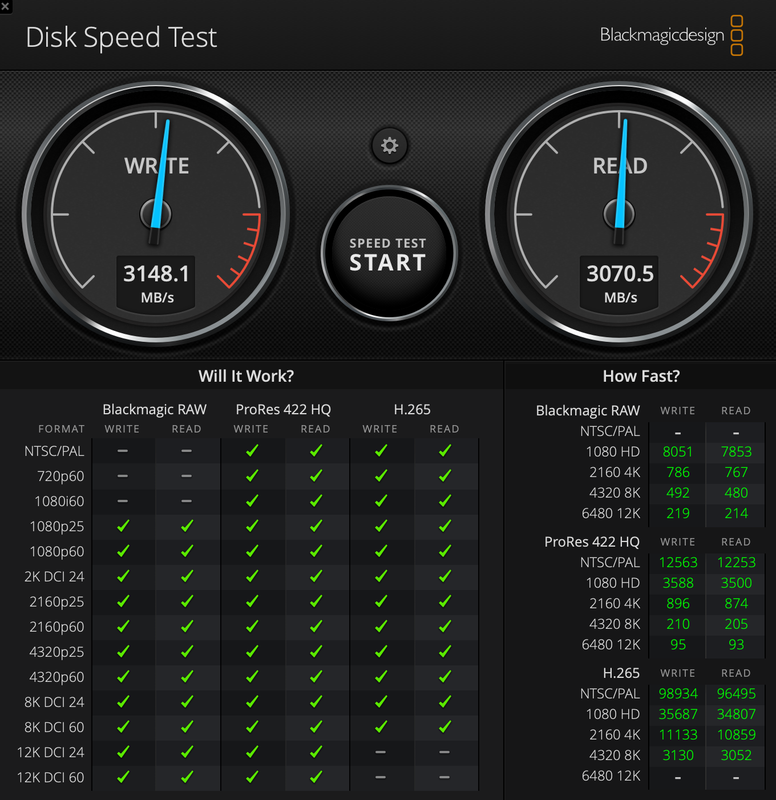
Around 3100 MB/s read and write.
I use it to back up my desktop and laptop by sneaker net. Wifi backups are vastly improved also if I so choose.
Around 3100 MB/s read and write.
I use it to back up my desktop and laptop by sneaker net. Wifi backups are vastly improved also if I so choose.

 Page 1 of 1


Popular
Back to top
 Follow TigerDroppings for LSU Football News