




- My Forums
- Tiger Rant
- LSU Recruiting
- SEC Rant
- Saints Talk
- Pelicans Talk
- More Sports Board
- Fantasy Sports
- Golf Board
- Soccer Board
- O-T Lounge
- Tech Board
- Home/Garden Board
- Outdoor Board
- Health/Fitness Board
- Movie/TV Board
- Book Board
- Music Board
- Political Talk
- Money Talk
- Fark Board
- Gaming Board
- Travel Board
- Food/Drink Board
- Ticket Exchange
- TD Help Board
Customize My Forums- View All Forums
- Show Left Links
- Topic Sort Options
- Trending Topics
- Recent Topics
- Active Topics
Started By
Message
re: Just got a raspberry pie
Posted on 2/3/17 at 9:35 am to dallastiger55


Posted on 2/3/17 at 9:35 am to dallastiger55
quote:There will always be somewhat of a delay with modern TV's but, if you haven't already, make sure the HDMI port you are plugged into is set to " Game Mode" in your TV's settings for that input. That should eliminate most of any perceived delay.
I have the buffalo 4 button remotes and I noticed a slight delay in the response when I press the buttons. Is this normal?
Also know that any additional converting you do with the video signal, like from HDMI to analog, will increase input lag.
 1
1


Posted on 2/3/17 at 10:14 am to MontyFranklyn
SNES is the best- CHRONO TRIGGER, EARTHBOUND, zelda link to the past, bomberman, mario kart (GOAT mario kart), Zombies ate my neighbors, street fighter 2, Super Mario RPG, donkey kongs
Posted on 2/3/17 at 10:22 am to spaceranger
SNES is the GOAT. No doubt
Posted on 2/3/17 at 12:28 pm to DieDaily
TTown
I have a camcorder 3.5 to rca cable I tried on my analog tv. It's weird I swapped the red and yellow and when I plug in the 3.5 it has a scrambled screen of Retro pie but when I stick it fully in the RP it goes black. It's odd
Any recs?
I have a camcorder 3.5 to rca cable I tried on my analog tv. It's weird I swapped the red and yellow and when I plug in the 3.5 it has a scrambled screen of Retro pie but when I stick it fully in the RP it goes black. It's odd
Any recs?

Posted on 2/3/17 at 12:36 pm to MontyFranklyn
Just got mine set up last night! Tired as hell this morning from staying up too late playing NBA Jam. The only issue I ran into was with the zipped roms. TTown mentioned that you could just drop the entire zipped file into the ROM folder, but for some reason that wouldn't work for me. It would copy over, but would not show up on the pie. When I extracted the files and only copied the .sms file, it worked. I hope I just missed a step because it would be nice to just drop the zipped file and not have to extract everything.
All in all, I'm really glad now that I wasn't able to find a NES Classic. I'm already brainstorming about how to build an arcade cabinet for another pie that just has MAME files.
All in all, I'm really glad now that I wasn't able to find a NES Classic. I'm already brainstorming about how to build an arcade cabinet for another pie that just has MAME files.
Posted on 2/3/17 at 12:37 pm to CaptSpaulding
You getting any lag ? My tv doesn't have a game mode
Posted on 2/3/17 at 12:52 pm to dallastiger55
No lag (buffalo 4 button controller), but I do have game mode. I was playing Super Mario and a few times that I jumped, it acted like I released the jump button too early, giving me a short jump instead of a big jump.
I think controller lag comes down to one or more of:
1. Not having game mode
2. The controller isn't as good as you remember. The buffalo controller is lighter than a real snes controller, and the D-pad is stiffer. Plus your fingers are probably bigger than they were the last time you played. It's hard to get an accurate L-D-R roll sometimes. But after about 30 minutes I was pulling off Hadukkens no problem. Or, the problem could always be:
3. You're not the wizard anymore!
I think controller lag comes down to one or more of:
1. Not having game mode
2. The controller isn't as good as you remember. The buffalo controller is lighter than a real snes controller, and the D-pad is stiffer. Plus your fingers are probably bigger than they were the last time you played. It's hard to get an accurate L-D-R roll sometimes. But after about 30 minutes I was pulling off Hadukkens no problem. Or, the problem could always be:
3. You're not the wizard anymore!

Posted on 2/3/17 at 1:14 pm to dallastiger55
quote:
Any recs?
Unfortunately, no. I haven't messed with RCA cables. I can help yall set up, add roms and maybe do a little customization but not too knowledgeable of the technical side of things like that. Unless it is an issue that I personally had to fix on mine, I more than likely wont know. And I was fortunate to have everything running smoothly from the start, so I didn't have to do any digging on those sorts of things. Sorry

I will add that retropie has a very active forum. Almost any topic that I did have to look up I usually found the answer from a youtube video already made on the topic or a quick google search that linked me to that forum.
DieDaily probably knows a lot more on the technical side than I do, maybe he can help with that.
Posted on 2/3/17 at 1:31 pm to CaptSpaulding
LINK
Check that link. It shows which type of files each emulator can read. The basic systems (NES, SNES, Genesis)can read regular zip files. Did you DL an entire catalog at once or each rom individually? That might be the issue. I DL'd individually so I could choose which version of the game I specifically wanted. I had no issues just dropping the ZIP file in those emulators by doing that. But if you DL catalogs, maybe you'll have to extract since they probably put all the different versions of each game into one zip file to save space.
quote:
you could just drop the entire zipped file into the ROM folder, but for some reason that wouldn't work for me
Check that link. It shows which type of files each emulator can read. The basic systems (NES, SNES, Genesis)can read regular zip files. Did you DL an entire catalog at once or each rom individually? That might be the issue. I DL'd individually so I could choose which version of the game I specifically wanted. I had no issues just dropping the ZIP file in those emulators by doing that. But if you DL catalogs, maybe you'll have to extract since they probably put all the different versions of each game into one zip file to save space.
Posted on 2/3/17 at 1:45 pm to TTownTiger
If you guys really want the easiest setup and all of the roms go to LINK link your account, and then go to their website and look for motion blue. Its a very easy setup and they have almost all of the systems and roms there

Posted on 2/3/17 at 1:50 pm to TTownTiger
quote:
Did you DL an entire catalog at once or each rom individually?
Yep, that's exactly what I did. And you're right, they put all regions in most of the files.
Thanks again for all the info!
Posted on 2/3/17 at 2:26 pm to dallastiger55
quote:I haven't tried connecting any of the Pi's I've set up via RCA, so this is all second hand info, but have a look at this thread, specifically the exchange I quoted below: LINK
Any recs?
quote:
If the analog video is scrambled then your cable has the signal and GND reversed.
quote:
What does this means?
quote:Looks like your cable might be the issue. I would do some more Google searches to see if you can find a verified RCA cable that will work with the Pi without re-wiring it yourself (unless you're into that sort of thing).
It means the TV gets an inverted video signal. It cannot find the sync pulses in that so the picture is probably not centred and has bent verticals. The TV cannot find the colour burst (because it cannot find horizontal syncs) so it cannot decode colour. And because of the inversion what should be black appears as white and vice versa. And because black level clamps need horizontal syncs, the blacks you do see may be 'super black' or grey and may be different in different parts of the screen.
ETA: Looks like this one is confirmed to work, but don't take my word for it. Someone down in the comments linked to it. And here is a review for it where the guy specifically says he used it successfully with his Raspberry Pi and posted pictures. YMMV.
This post was edited on 2/3/17 at 2:34 pm
Posted on 2/3/17 at 6:27 pm to DieDaily
thanks again. I really think its best to do RCA because the TV my kids use in our spare room will be the TV i want this on and it doesnt have HDMI.
Posted on 2/3/17 at 7:40 pm to dallastiger55
No problem. Just be aware it might not quite be "plug n' play" with that cable depending on your TV. It's possible you may need to play around with the config.txt file to adjust overscan and frame buffer settings if the image still doesn't look quite right after plugging it in. There is good info here on that but we can help you with it if it comes to that.
I've had to mess with overscan settings to get the Raspberry Pi picture to look right on one of my TV's and it was 1.) Adjust numbers in config.txt file. 2.) Reboot Pi. 3.) Check how screen looks after reboot.
Lather, rinse, repeat until it looked right. I'm not an expert on these more specific video settings. I've gotten by with trial and error mostly.
I've had to mess with overscan settings to get the Raspberry Pi picture to look right on one of my TV's and it was 1.) Adjust numbers in config.txt file. 2.) Reboot Pi. 3.) Check how screen looks after reboot.
Lather, rinse, repeat until it looked right. I'm not an expert on these more specific video settings. I've gotten by with trial and error mostly.
Posted on 2/3/17 at 9:24 pm to DieDaily
Ok thanks again
I switched the A and B controls on the buffalo remote. Did you do that?
The way it had it set up all the games were backwards
I switched the A and B controls on the buffalo remote. Did you do that?
The way it had it set up all the games were backwards
Posted on 2/3/17 at 11:23 pm to dallastiger55
I have not had that issue. I've now setup 5 Raspberry Pi's for myself, friends, and family and I've used 2 iBuffalo SNES gamepad's for each build. I map it according to the labels on the buttons and it's worked fine for every emulator.
However, if you're mapping something like an Xbox 360 controller, though, it will seem backwards because on those controllers X and A come before Y and B when reading from left to right. Nintendo controllers have always flipped them, but the iBuffalo correctly matches Nintendo's button naming convention.
However, if you're mapping something like an Xbox 360 controller, though, it will seem backwards because on those controllers X and A come before Y and B when reading from left to right. Nintendo controllers have always flipped them, but the iBuffalo correctly matches Nintendo's button naming convention.
This post was edited on 2/3/17 at 11:27 pm
Posted on 2/4/17 at 9:08 am to DieDaily
ok i dont know what i did wrong.
for NES games, A and B are backwards, but for SNES games its right.
Also, what do you do when the system cant find matches for the cover art of the games?
for NES games, A and B are backwards, but for SNES games its right.
Also, what do you do when the system cant find matches for the cover art of the games?
Posted on 2/4/17 at 9:30 am to dallastiger55
Which scraper did you use? I'm assuming the default one in the menu.
The SSelph scraper is a lot better, it just takes a little bit more to find because you have to log out of emulation station and type in a startup code. It is easy to do though. Here is the instructions on how to do that: LINK
I transferred all my roms first then scraped my entire library at once with SSelph. Then used the default scraper in the menu to fill in any missing ones. Think I might have 10-15 games that I noticed in my current 1200 game library that weren't covered by either scraper. I just left them alone but there is a way you can transfer in your own images to assign to a game that wasn't scraped. Those directions are at the bottom of the link.
Edit:
Nes controller
Snes controller:
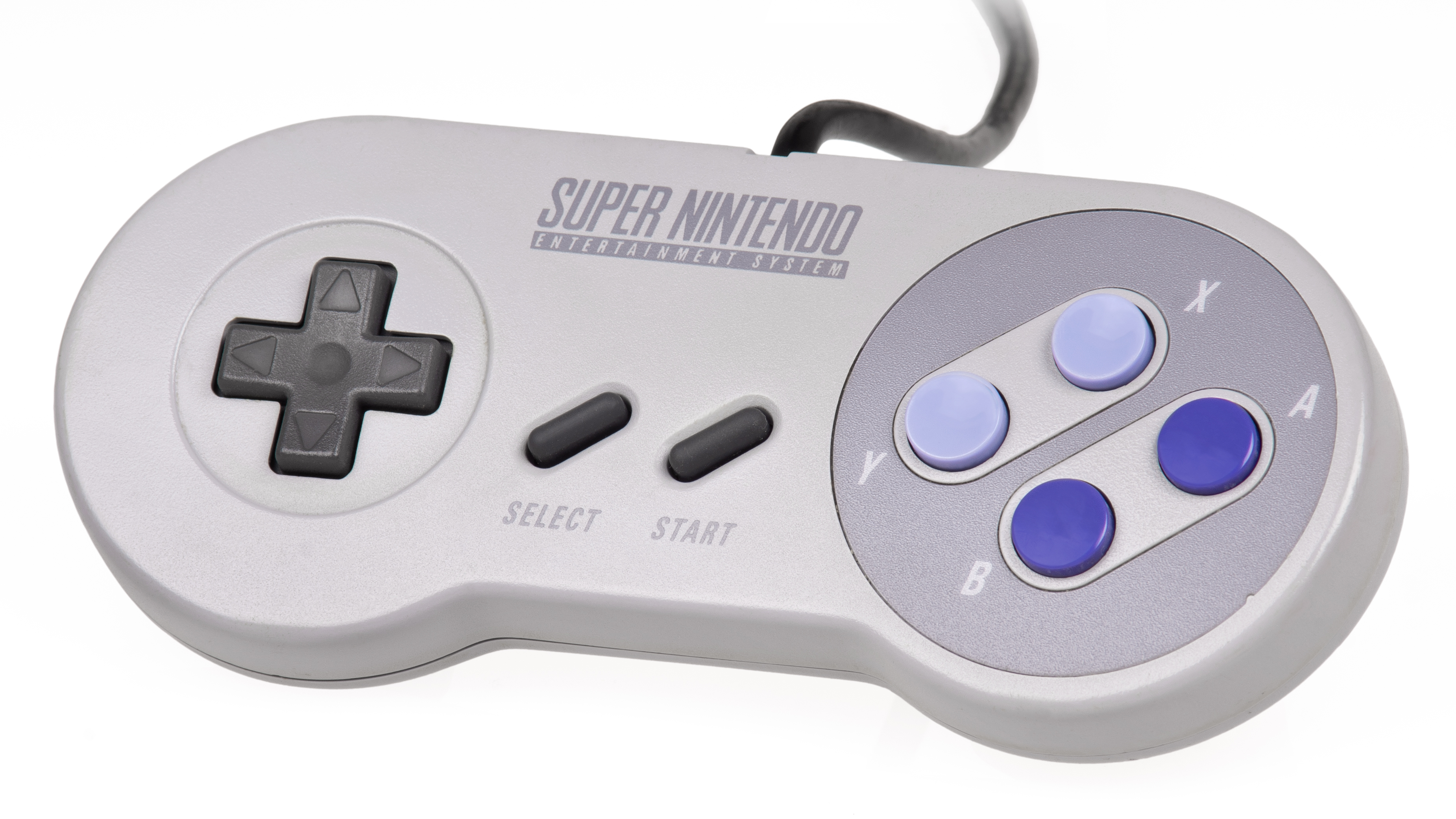
Maybe you just don't remember, but the A-B buttons for both NES & SNES were "backwards" from more recent generations of consoles. Maybe that's throwing you off. I had kinda forgot about that too honestly. But both systems are the same way with the B button on the left.
The SSelph scraper is a lot better, it just takes a little bit more to find because you have to log out of emulation station and type in a startup code. It is easy to do though. Here is the instructions on how to do that: LINK
I transferred all my roms first then scraped my entire library at once with SSelph. Then used the default scraper in the menu to fill in any missing ones. Think I might have 10-15 games that I noticed in my current 1200 game library that weren't covered by either scraper. I just left them alone but there is a way you can transfer in your own images to assign to a game that wasn't scraped. Those directions are at the bottom of the link.
Edit:
Nes controller
Snes controller:
Maybe you just don't remember, but the A-B buttons for both NES & SNES were "backwards" from more recent generations of consoles. Maybe that's throwing you off. I had kinda forgot about that too honestly. But both systems are the same way with the B button on the left.
This post was edited on 2/4/17 at 9:45 am
Posted on 2/4/17 at 6:41 pm to TTownTiger
Question- decided to add some N64 roms the same way as I've always done but for some reason they aren't showing up.
They are all .n64 files I believe
They are all .n64 files I believe


Posted on 2/4/17 at 6:55 pm to MontyFranklyn
Enjoy
I love mines
I love mines

 Page 4 of 6

Popular
Back to top
 Follow TigerDroppings for LSU Football News