




- My Forums
- Tiger Rant
- LSU Recruiting
- SEC Rant
- Saints Talk
- Pelicans Talk
- More Sports Board
- Winter Olympics
- Fantasy Sports
- Golf Board
- Soccer Board
- O-T Lounge
- Tech Board
- Home/Garden Board
- Outdoor Board
- Health/Fitness Board
- Movie/TV Board
- Book Board
- Music Board
- Political Talk
- Money Talk
- Fark Board
- Gaming Board
- Travel Board
- Food/Drink Board
- Ticket Exchange
- TD Help Board
Customize My Forums- View All Forums
- Show Left Links
- Topic Sort Options
- Trending Topics
- Recent Topics
- Active Topics
Started By
Message

 1
1



Posted on 6/5/17 at 1:51 pm to Scooby
than you should be able to get way faster than 25Mbps. but im doubting it is fiber if thats all your getting.
Posted on 6/5/17 at 2:25 pm to CarRamrod
Just checked with a future neighbor, it is DSL.

Posted on 6/5/17 at 4:17 pm to CarRamrod
quote:
i i was thinking this could be an issue, i just havent dove down into this yet. I will tonight and plug in a hardwire to see how fist it really is. Do you have your old router as an access point? Im planning on running a hardwire to my bedroom across the house so i can get true 4k streaming in the bedroom, so doing this i will just add my other nighthawk there for better coverage outside.
Have you seen reduced speeds in access points with this router. I hate that you have to use their supplied router. (I know you can just use it as a passthrough but i hear that reduced your speeds a great deal.
I wired my whole house after getting gigapower. I have two 8-port switches. One is in my living room, and the other is in my master bedroom. I have another 5-port switch at the gateway.
I put a cheap Netgear Wireless-N router in the living room with its own 2 networks. I let me guests connect to it, and I use it occasionally to make sure everything is up to par with it. It's hooked up off of an 8-port switch.
I haven't ever tried using access points at home. I just use multiple networks and spread out devices among them.
Posted on 6/5/17 at 4:36 pm to BigD45
quote:interesting. you havent run into any trouble with using another router hooked up to another router?
I put a cheap Netgear Wireless-N router in the living room with its own 2 networks. I let me guests connect to it, and I use it occasionally to make sure everything is up to par with it. It's hooked up off of an 8-port switch.
i have 4 switches running all my cameras and miscellaneous stuff, so i need to get all of those wired to my fiber router. only think is most of those are in my AV closet and i have 6 cameras wired in there. So i plan to just run CAT to those switches in there.
I have a lot of playing to do i just wanted to make sure the fiber was running correctly before switching everything over from my cox internet. I have a good bit of network settings to get straight so i can access all my shite remotely.
This post was edited on 6/5/17 at 4:39 pm
Posted on 6/5/17 at 4:40 pm to CarRamrod
quote:
interesting. you havent run into any trouble with using another router hooked up to another router?
Nah, I never have had any problems doing it. You just have to reset your router after you hook it all up in order for it to assign everything an IP address.
Posted on 6/6/17 at 6:38 am to Scooby
You will never see a faster speed available from AT&T unless fiber is run unfortunately. Our DSL network is distance limited. The further you are from the vrad the less speed you are able to get.
If 25mbps is the fastest offering you can get at that particular address then it is somewhere between 2600-3200 ft away from the vrad depending on whether it is a package with:
a) internet only, 3000ft
b) internet + U-verse tv, 2600ft
c) combo of a & b on 17mhz profile, 3200ft
If 25mbps is the fastest offering you can get at that particular address then it is somewhere between 2600-3200 ft away from the vrad depending on whether it is a package with:
a) internet only, 3000ft
b) internet + U-verse tv, 2600ft
c) combo of a & b on 17mhz profile, 3200ft
Posted on 6/6/17 at 6:39 am to BigD45
You guys really know what your talking about  .
.
Question i have the At&T router running thru my nighthawk 7000 i used when i had comcast. Would connecting through the nighthawk router slow down speeds when connecting wireless or is it better just to use the At&T router without nighthawk router? The nighthawk router gets better range is why i was using it.
. Question i have the At&T router running thru my nighthawk 7000 i used when i had comcast. Would connecting through the nighthawk router slow down speeds when connecting wireless or is it better just to use the At&T router without nighthawk router? The nighthawk router gets better range is why i was using it.
Posted on 6/6/17 at 7:17 am to FLObserver
You might lose 1 millisecond or 2 on your ping time, but that isn't much of anything when you're comparing 2ms to 4ms. Comcast usually pings at 9 or 10.
Their Arris and Cisco XB3 sucks a high, hard one. Most of the DOCSIS 3.0 gateways absolutely blow. They're supposed to be working on or have issued a square looking Google-like gateway in places that have DOCSIS 3.1, but it wouldn't surprise me if it winds up being trash as well.
Their Arris and Cisco XB3 sucks a high, hard one. Most of the DOCSIS 3.0 gateways absolutely blow. They're supposed to be working on or have issued a square looking Google-like gateway in places that have DOCSIS 3.1, but it wouldn't surprise me if it winds up being trash as well.
Posted on 6/6/17 at 9:12 am to BigD45
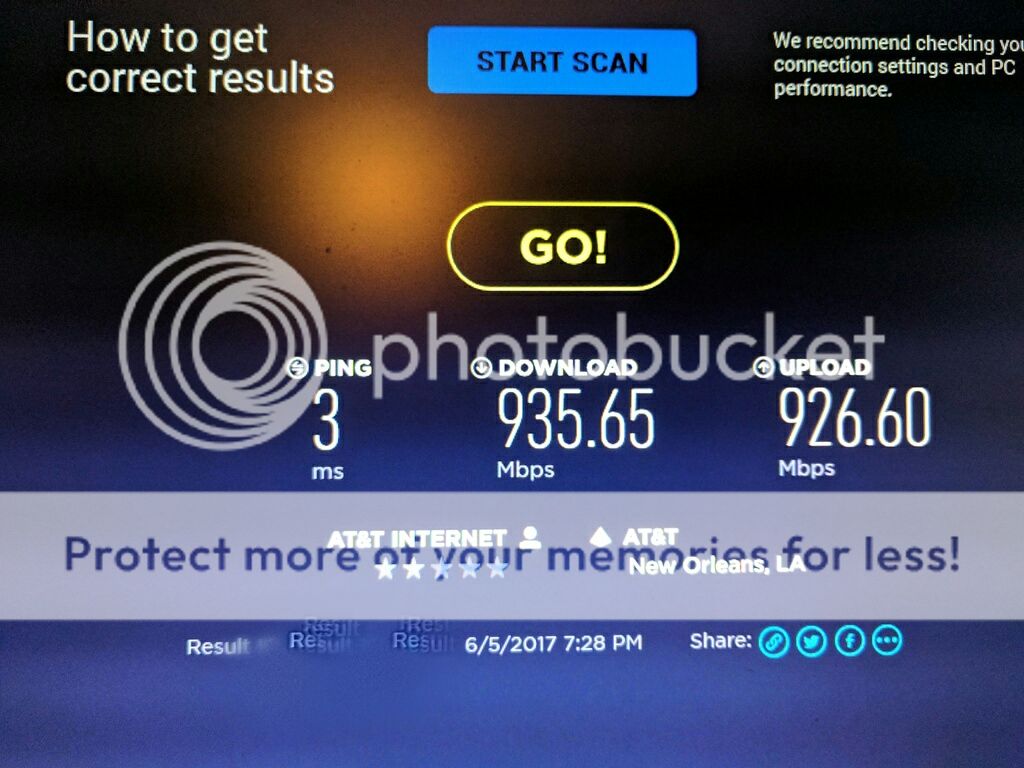
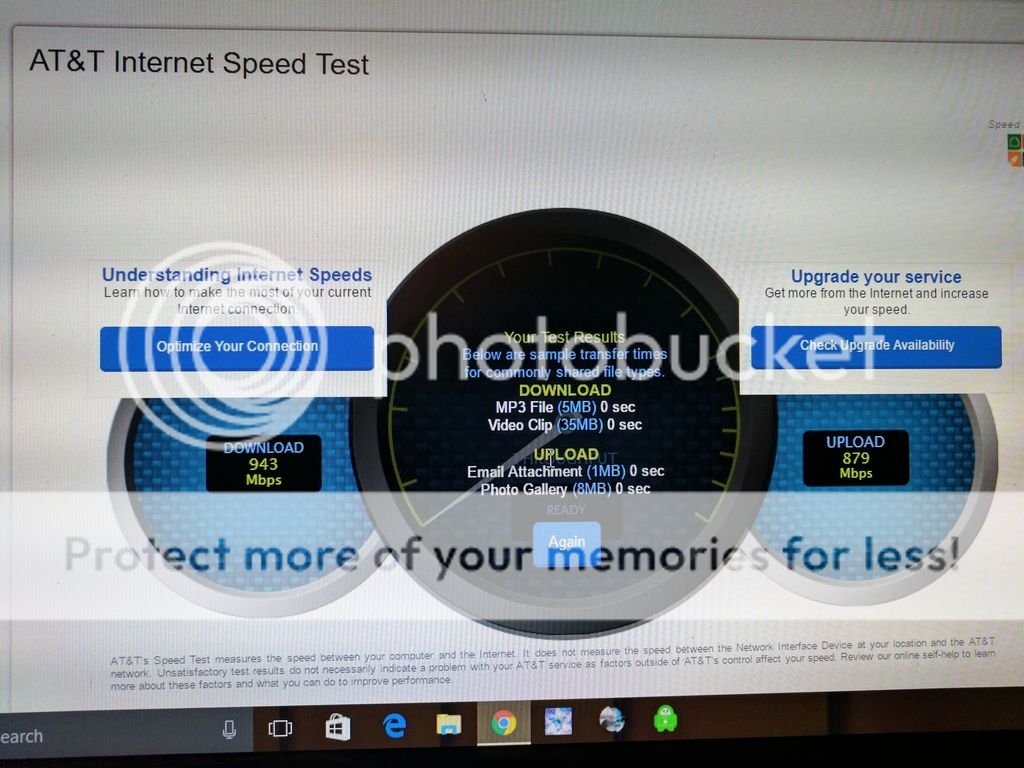
well look at this. I hardwired my workhorse PC and this is what i got from both speedtest and ATT's speed test.

Posted on 6/6/17 at 12:27 pm to CarRamrod
Dang Son! I'm only getting like 400 to 500 mbps on mine 
So Mr. Ramrod what did you do to increase the speed? did you just go with the at&t router and cut out the other router? I ask because i have the at&t router that connects directly to my main PC where i do the Speed test. From the road where the main fiber runs to my house is only like 15 yards then from the wall to my router is about 6 feet.My Pc then connects directly to router. The guy installing said the speeds are only reaching about 600 mbps in my neighborhood. Not sure i will ever get that much speed. pretty sweet i must say. Never thought id be complaining about 4 to 5 hundred mbps download speeds
So Mr. Ramrod what did you do to increase the speed? did you just go with the at&t router and cut out the other router? I ask because i have the at&t router that connects directly to my main PC where i do the Speed test. From the road where the main fiber runs to my house is only like 15 yards then from the wall to my router is about 6 feet.My Pc then connects directly to router. The guy installing said the speeds are only reaching about 600 mbps in my neighborhood. Not sure i will ever get that much speed. pretty sweet i must say. Never thought id be complaining about 4 to 5 hundred mbps download speeds
This post was edited on 6/6/17 at 12:41 pm
Posted on 6/6/17 at 3:43 pm to FLObserver
as of right not i am using the ATT router. These speeds are from my gaming PC hard wired to the router with a CAT5E cable. I used my laptop and hardwired and couldn't get but 400. IDK if this is hardware limitations or settings or what. from my router ran through the house to the splice box is a good 20 feet. then out to my box and down the sreet to the main hub is a good 40-50 yards. guy had to use his longest cable he had.
Posted on 6/7/17 at 3:05 pm to Tigershatebama
Umm I only pay 70 a month so yea I can live with what I pay for.
Posted on 6/7/17 at 10:43 pm to scabs
Install at 9:00 AM tomorrow. 
Posted on 6/8/17 at 9:27 am to jdd48
still waiting fro them to contact me to come bury the line.

Posted on 6/8/17 at 8:39 pm to CarRamrod
Those of you with gig fiber, are you still pleased? What kind of speeds should I expect to get wirelessly, patio for example..? $130/month for gig + DTV Choice is hard to pass up...
I'd basically be paying a small amount more than I am now with DTVN
I'd basically be paying a small amount more than I am now with DTVN
This post was edited on 6/8/17 at 8:40 pm
Posted on 6/8/17 at 9:25 pm to CarRamrod
quote:
still waiting fro them to contact me to come bury the line.
They never even contacted me over here. I think the installation was done on a Tuesday, and they came and buried the line one morning a few days later.
Posted on 6/8/17 at 9:27 pm to Uncle JackD
quote:
Those of you with gig fiber, are you still pleased? What kind of speeds should I expect to get wirelessly, patio for example..? $130/month for gig + DTV Choice is hard to pass up...
I'd basically be paying a small amount more than I am now with DTVN
I've had it since December, and I haven't had any problems. I've restarted my gateway 3 times. Other than that, nothing major.
My gateway is in my master bedroom closet on the 2nd floor. I can still get WiFi on my patio and all the way to the street.
Posted on 6/8/17 at 9:30 pm to BigD45
quote:Thats the modem/router?
gateway is in my master bedroom closet
When I had LUS fiber, there wasn't a modem involved.. why does att fiber use one?
Posted on 6/8/17 at 9:33 pm to Uncle JackD
Yes, the gateway is the modem/router.
I don't know why they use one. Bottlegnome posts here. He works for at&t, and he can shed more light on their reasoning more than I can.
I don't know why they use one. Bottlegnome posts here. He works for at&t, and he can shed more light on their reasoning more than I can.

 Page 3 of 4

Popular
Back to top
 Follow TigerDroppings for LSU Football News