




- My Forums
- Tiger Rant
- LSU Recruiting
- SEC Rant
- Saints Talk
- Pelicans Talk
- More Sports Board
- Fantasy Sports
- Golf Board
- Soccer Board
- O-T Lounge
- Tech Board
- Home/Garden Board
- Outdoor Board
- Health/Fitness Board
- Movie/TV Board
- Book Board
- Music Board
- Political Talk
- Money Talk
- Fark Board
- Gaming Board
- Travel Board
- Food/Drink Board
- Ticket Exchange
- TD Help Board
Customize My Forums- View All Forums
- Show Left Links
- Topic Sort Options
- Trending Topics
- Recent Topics
- Active Topics
Started By
Message
Networking closet help for a new build
Posted on 2/24/26 at 6:43 pm


Posted on 2/24/26 at 6:43 pm
I am currently planning a new home build and am setting up a dedicated networking closet. My goal is a clean, hidden setup that stays simple but functional. I already have my Smurf Tubing ready to go and plan to run PoE to every bedroom and the office with multiple drops in each room. I also have two or three wireless access points planned for the ceilings.
Inside the closet, I want to hide my fiber box, a 24 or 32-port Ubiquiti PoE switch (leaning Ubiquiti), an A/V receiver, an Xbox, and a Blu-ray player. I would prefer to have everything seated right in a networking rack if possible.
I am looking for recommendations on what type of networking rack I should consider. My main requirements are that it needs to attach to the wall and provide really easy access to the back of the ports for maintenance. Since the A/V receiver is likely the deepest and heaviest piece of equipment, I want to make sure I get the sizing right.
I am also still undecided on whether to go with Cat6, Cat6a, or Cat7 for the runs. If anyone has suggestions on the best rack models for this type of setup or advice on which cable standard makes the most sense for a long-term home build, I’d love to hear your thoughts -- and see your setup.
Inside the closet, I want to hide my fiber box, a 24 or 32-port Ubiquiti PoE switch (leaning Ubiquiti), an A/V receiver, an Xbox, and a Blu-ray player. I would prefer to have everything seated right in a networking rack if possible.
I am looking for recommendations on what type of networking rack I should consider. My main requirements are that it needs to attach to the wall and provide really easy access to the back of the ports for maintenance. Since the A/V receiver is likely the deepest and heaviest piece of equipment, I want to make sure I get the sizing right.
I am also still undecided on whether to go with Cat6, Cat6a, or Cat7 for the runs. If anyone has suggestions on the best rack models for this type of setup or advice on which cable standard makes the most sense for a long-term home build, I’d love to hear your thoughts -- and see your setup.
 7
7


Posted on 2/24/26 at 8:45 pm to Will Cover
Cat6a for the cable. Cat 7 rating is still not recognized by the TIA (ie the rating is not legitimate/tested). 6A will handle 10GBps, your network equipment couldn't outrun it.
I've had good luck with navepoint racks, nothing fancy but they get the job done.
I personally wouldn't recommend wall mount, especially if you are going to end up putting a ups in there.
Couple personal tips ive learned from building commercial buildings...
1. Put a pipe or two in at your headend rack. Easiest and cheapest way to do this is use a couple 2" PVC pipes stubbed out the wall/ceiling into the attic. Cheaper than conduit, better than smurf tube.
2. Put 2 separate duplex outlets at your rack, on 2 separate circuits.
3. Include a ups in your build, will save you tons of headache from power blips making your whole system power cycle.
4. Run data for cameras, even if you aren't going to put them initially. Way easier during construction.
5. If you want everything in a rack, investigate IR repeaters. Dumb thing to overlook. Can be done over cat6.
6. Include a NAS. My entire life is filed on mine. Every car maintenance receipt, healthcare receipt, important docs, all family pics, etc. In a file structure like God intended.
I've had good luck with navepoint racks, nothing fancy but they get the job done.
I personally wouldn't recommend wall mount, especially if you are going to end up putting a ups in there.
Couple personal tips ive learned from building commercial buildings...
1. Put a pipe or two in at your headend rack. Easiest and cheapest way to do this is use a couple 2" PVC pipes stubbed out the wall/ceiling into the attic. Cheaper than conduit, better than smurf tube.
2. Put 2 separate duplex outlets at your rack, on 2 separate circuits.
3. Include a ups in your build, will save you tons of headache from power blips making your whole system power cycle.
4. Run data for cameras, even if you aren't going to put them initially. Way easier during construction.
5. If you want everything in a rack, investigate IR repeaters. Dumb thing to overlook. Can be done over cat6.
6. Include a NAS. My entire life is filed on mine. Every car maintenance receipt, healthcare receipt, important docs, all family pics, etc. In a file structure like God intended.
Posted on 2/24/26 at 9:04 pm to Will Cover
Honestly there isn’t anything special about one rack vs the other in my opinion. All depends on if you want it enclosed, open, to have its own vent or fan system, etc. They also have racks that are freestanding that are on wheels vs wall, you can also have a wall mounted one with shelves that slide like drawers, etc.
Personally, if I were building, I’d make sure my network room was properly vented because the regular closet in my house that I turned into a network closet gets really hot in the summer.
As far as cable, the general online nerd consensus is to go with Cat6 or 6a and don’t even bother with higher cats. There is greater likelihood to get scammed with fake Cat 7 or 8, and quite literally almost nothing requires either standard. Both 6 and 6a will be relatively future proof for years to come and when things start to outpace either of those, we likely won’t be using Ethernet but Fiber lines.
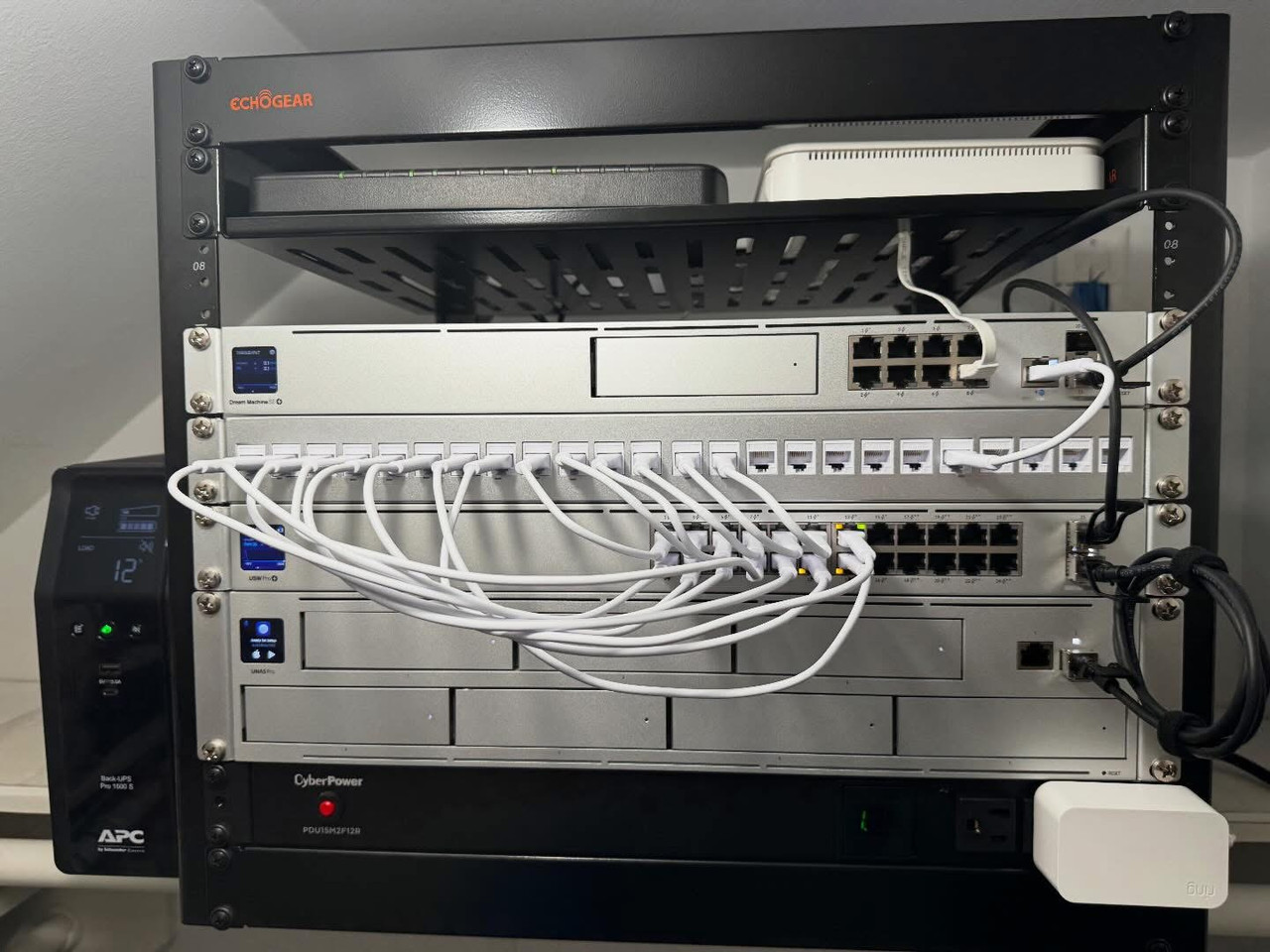
My modest setup:
Personally, if I were building, I’d make sure my network room was properly vented because the regular closet in my house that I turned into a network closet gets really hot in the summer.
As far as cable, the general online nerd consensus is to go with Cat6 or 6a and don’t even bother with higher cats. There is greater likelihood to get scammed with fake Cat 7 or 8, and quite literally almost nothing requires either standard. Both 6 and 6a will be relatively future proof for years to come and when things start to outpace either of those, we likely won’t be using Ethernet but Fiber lines.
My modest setup:
This post was edited on 2/24/26 at 9:17 pm
Posted on 2/24/26 at 9:10 pm to Will Cover
Baseball hit my rec for NavePoint, i usually go with them or StarTech. There's also SysRack or if trying for functionality at lowest price Tecmojo. This option is intriguing but have never tried it (plan well with slack)
LINK
LINK


Posted on 2/24/26 at 9:31 pm to MStant1
Ubiquiti fanboys are so cute
Posted on 2/25/26 at 7:55 am to bluebarracuda
Guilty


Posted on 2/25/26 at 8:12 am to Will Cover
you will need proper cooling for a "closet." Good luck with that. That can have all sorts of ramifications if not done properly and it is long odds to find a residential person that can do that.
Personally, I'd recommend putting your stuff in a portion of an unfinished area like a basement if you will have one.
Personally, I'd recommend putting your stuff in a portion of an unfinished area like a basement if you will have one.
This post was edited on 2/25/26 at 8:14 am
Posted on 2/25/26 at 8:48 am to Will Cover
quote:
I want to hide my fiber box
If it's an ATT Fiber box, that's 6u
quote:
24 or 32-port Ubiquiti PoE switch (leaning Ubiquiti)/quote]
2U since you'll want a patch panel too
[quote]A/V receiver
probably 4u
quote:
an Xbox
Could probably share the shelf with the fiber box
quote:
Blu-ray player
Another 3-4u I would guess
Probably looking at a 15U rack, minimum. You could add a PDU to the rack to run all power to, and then have a floor model UPS to avoid filling more rack space. Navepoint makes some nice wall mountable racks with swinging gates


Posted on 2/25/26 at 9:53 am to Will Cover
i have this one and love it so much. the instructions and labels are so irreverant that it made setting everything up really fun  but there may be cheaper alternatives on amazon that work just as well.
echogear 15u
seriously, the setup instructions that come with the rack are hysterical.
but there may be cheaper alternatives on amazon that work just as well. echogear 15u
seriously, the setup instructions that come with the rack are hysterical.


Posted on 3/4/26 at 7:57 am to Will Cover
quote:
with multiple drops in each room
I did this and don't use them. I ran drops to each TV location and to my office, camera locations, and while I ran drops to each bedroom and other rooms in the house, everything else is wireless.
I have probably 50 cables in my closet, and I use maybe 12 of them.
Posted on 3/4/26 at 8:30 am to kywildcatfanone
quote:
I did this and don't use them
It really is an antiquated thing to do in homes with modern wireless technology
Posted on 3/4/26 at 9:00 am to bluebarracuda
I mean if you’re someone who is asking about how build a network room and you plan to have a network rack, then we’re not dealing with the average person who would be perfectly satisfied with an Eero from Amazon. Probably less than 1% of home users actually need anything more than 100mbps connections (if that even), yet all of us are rushing out to make sure we have at least 1gbps.
Posted on 3/4/26 at 9:11 am to MStant1
quote:
I mean if you’re someone who is asking about how build a network room and you plan to have a network rack, then we’re not dealing with the average person who would be perfectly satisfied with an Eero from Amazon. Probably less than 1% of home users actually need anything more than 100mbps connections (if that even), yet all of us are rushing out to make sure we have at least 1gbps.
Wifi 6 and 7 can easily match 1gbps, which is why running cable to every room is antiquated. Poor design/implementation of wireless would cause you not to get these speeds. In a new build it makes a little bit of sense to go more overkill, but I wouldn't be trying to hardwire every device and every room in the house
Posted on 3/4/26 at 9:33 am to bluebarracuda
quote:
Wifi 6 and 7 can easily match 1gbps, which is why running cable to every room is antiquated. Poor design/implementation of wireless would cause you not to get these speeds. In a new build it makes a little bit of sense to go more overkill, but I wouldn't be trying to hardwire every device and every room in the house
100% agree but not wiring the backhaul would be a mistake. . Cheap deco x55 handles 100+ devices just fine when wired and gives ~1000mbps to all 160mhz devices and ~650mbps to 80mhz clients.
I have a few minis wired up in my IT area but other than that, it’s just cameras and APs that have wires.
Posted on 3/4/26 at 9:46 am to Dallaswho
quote:
100% agree but not wiring the backhaul would be a mistake
I never said not to do this, FYI
Posted on 3/4/26 at 9:55 am to bluebarracuda
I wasn’t saying wifi isn’t capable of running high speeds, I was more commenting on actual need vs desire.
For the average person, sure just grab a cheap mesh system from Amazon and move on with life. My assumption that since the OP is dedicating a room to networking and asking about racks, etc. that they either have larger needs (e.g., hosting servers, managing and editing large files over the network, heavy gamer, etc.) and/ or they are just a hobbyist who wants it for nothing more than the satisfaction of knowing they could direct connect in every room. If I were building, I’d absolutely be running drops to every room, dedicated drop(s) for a AP(s), and outdoor drops for cameras, outdoor APs, etc.
For the average person, sure just grab a cheap mesh system from Amazon and move on with life. My assumption that since the OP is dedicating a room to networking and asking about racks, etc. that they either have larger needs (e.g., hosting servers, managing and editing large files over the network, heavy gamer, etc.) and/ or they are just a hobbyist who wants it for nothing more than the satisfaction of knowing they could direct connect in every room. If I were building, I’d absolutely be running drops to every room, dedicated drop(s) for a AP(s), and outdoor drops for cameras, outdoor APs, etc.
Posted on 3/4/26 at 10:13 am to MStant1
quote:
If I were building, I’d absolutely be running drops to every room, dedicated drop(s) for a AP(s), and outdoor drops for cameras, outdoor APs, etc.
I wouldn’t in a million years do that. I mostly used old CAT-5 POTS wires/holes for my APs. Pulled coax out for one.
My house was built in 2001 or so and is filled with built-in obsolete tech. Probably 50x instances of outdated alarm/phone/cable junk and borderline outdated/tacky flat screen wall kits. There were built ins for the y2k era kitchen desk despite having an actual office. There is also a huge cubby hole obviously for entertainment system or one of those floor standing big screens. It took forever to remodel/disguise that.
If I could build new, I’d leave out the thermostats and half the switches. Cutting a new hole and running wire takes 15 minutes. Repair takes days.

 Page 1 of 1


Popular
Back to top
 Follow TigerDroppings for LSU Football News